Information
04.28.2026 Information
PicrewApp Update Information
▼Update Contents
🎨 Brand New App Design (UI)!
We've significantly revamped the screen design to make finding and playing with image makers more intuitive and smoother than ever.
🌙 Highly Anticipated "Dark Mode" is Here!
We've added the much-requested Dark Mode.
You can switch it on or off anytime by going to the top-right menu "≡" > and tapping the "☀" icon in the bottom left.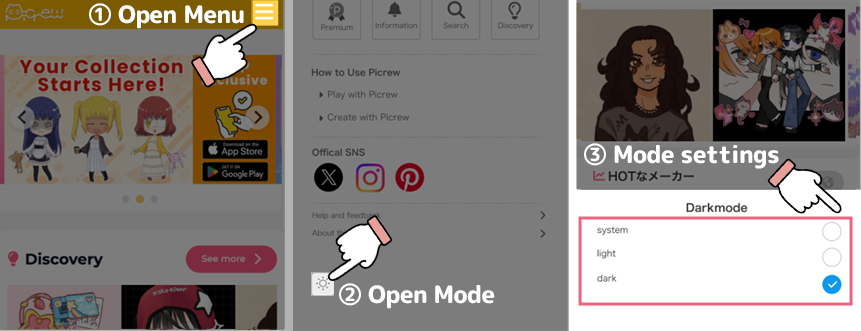
🩷 "Bookmarks" are now "Favorites"!
The feature works exactly the same, but we've updated the name to be more friendly.
(*The name on the web version of Picrew will also be updated to "Favorites" gradually.)
🔔 Get Notified When Your Favorite Makers Update!
You will now receive notifications when an image maker you've added to your Favorites gets updated.
Please "Allow" push notifications so you don't miss out on the latest info!
Updated here 👇
AppStore: https://apps.apple.com/app/id6477856733
GooglePlay: https://play.google.com/store/apps/details?id=com.tc.picrew.me
🎨 Brand New App Design (UI)!
We've significantly revamped the screen design to make finding and playing with image makers more intuitive and smoother than ever.
🌙 Highly Anticipated "Dark Mode" is Here!
We've added the much-requested Dark Mode.
You can switch it on or off anytime by going to the top-right menu "≡" > and tapping the "☀" icon in the bottom left.
🩷 "Bookmarks" are now "Favorites"!
The feature works exactly the same, but we've updated the name to be more friendly.
(*The name on the web version of Picrew will also be updated to "Favorites" gradually.)
🔔 Get Notified When Your Favorite Makers Update!
You will now receive notifications when an image maker you've added to your Favorites gets updated.
Please "Allow" push notifications so you don't miss out on the latest info!
Updated here 👇
AppStore: https://apps.apple.com/app/id6477856733
GooglePlay: https://play.google.com/store/apps/details?id=com.tc.picrew.me